
Aosu
AosuLifeCommunication
3.5724.00 Reviews
- Version
- 5.3.11
- Installs
- 1.00M
- Age Rating
- Everyone
Screenshots
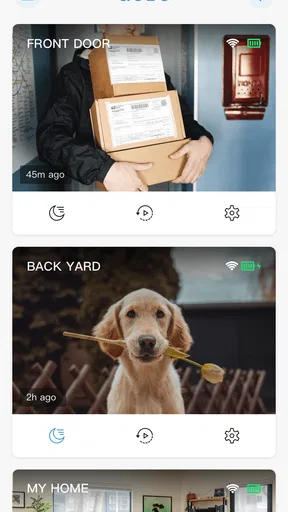
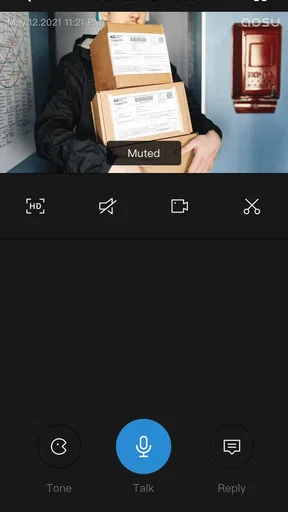
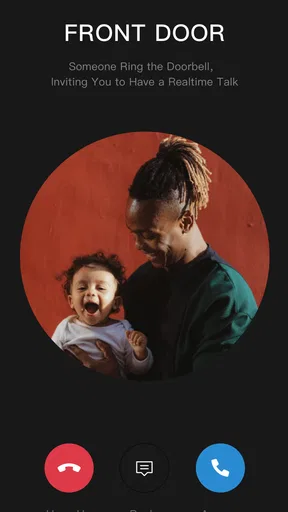
Our Review of Aosu
 Analysis by Appyee
When I look at a smart-camera app, I am not only asking whether it can show a live picture. I want to know whether it makes checking home feel simple, whether alerts are useful rather than noisy, and whether I can understand what is happening without spending time fighting the interface. Aosu is a communication app from AosuLife built around Aosu smart cameras, and after using it, I see its main appeal clearly: it is a focused companion for people who already use this camera family and want a direct way to keep an eye on home.
The app is free and suitable for everyone, which makes trying it fairly easy. Its overall rating sits at around three and a half stars from roughly two thousand seven hundred ratings, while more than a million people have installed it. Those figures suggest a product with a substantial user base but also a mixed experience. That matches my impression: Aosu can be convenient when your cameras are compatible and your expectations are practical, but it is not the sort of app I would recommend blindly to someone comparing every smart-home platform.
How I would decide whether Aosu is right for me
My first decision criterion would be ownership. If I already have an Aosu smart camera, using the company’s own app is the natural starting point. The value comes from keeping camera access, household monitoring and communication in one place instead of trying to make unrelated services cooperate. If I do not own an Aosu camera yet, the app alone is not a reason to switch. Its usefulness depends heavily on the hardware it is meant to accompany.
The second criterion is the kind of monitoring I need. Aosu makes sense for checking a room, seeing whether someone has arrived, keeping an eye on a pet, or taking a quick look at home while I am away. It is less convincing as a complete security-control center for someone who wants a broad collection of brands, advanced automation, or a single dashboard for every smart device. I would decide first whether I want a camera companion or a wider smart-home hub.
Daily convenience matters more than a long feature list. In a camera app, I want the path from opening the app to seeing the relevant view to feel obvious. I also want to know which camera I am viewing, avoid accidental actions, and move between household checks without unnecessary steps. Aosu’s focused purpose helps here, but the experience still depends on how many cameras I have and how clearly I organize them.
There is also a practical device question. The current version is 5.3.11, and the app requires Android 8.0 or later. That is a reasonable starting point for many Android users, but anyone with an older phone should check compatibility before planning around it. On iOS, I would still make sure the phone and camera combination is supported before buying hardware. A camera app is only useful when the phone, account and camera work together reliably.
The everyday scenario where it feels most useful
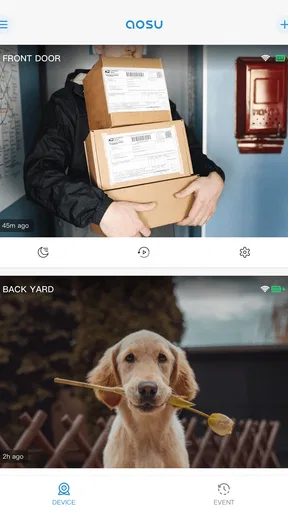
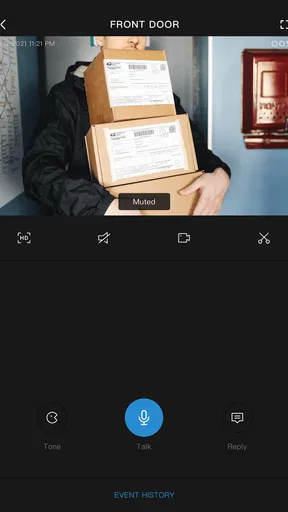
Imagine leaving home in the morning and wondering whether a delivery has arrived or whether a family member is back. Instead of calling someone or asking a neighbor, I can open the camera app and check the relevant area. Later, I might use the same routine to look in on a pet or confirm that a room is empty. This is not dramatic, but it is exactly the kind of small reassurance that makes a camera companion worthwhile.
I would set up that routine around a few deliberate habits. I would give each camera a clear, location-based name, place the most frequently checked view where I can reach it quickly, and avoid adding cameras I rarely need unless they genuinely improve coverage. Naming is a small detail, but it becomes important when several similar views are available. “Front room” is more useful in a hurry than a vague factory label.
Another useful habit is deciding what I actually need to check before opening the app. If I am looking for a person or pet, I need a different view and timing than when I am checking whether a door area is quiet. Treating the app as part of a routine, rather than constantly watching it, reduces distraction and makes the camera more useful as a communication tool.
What makes the focused camera approach appealing
Aosu’s strongest quality is its narrow purpose. Because it is designed around Aosu smart cameras, I do not have to begin by building a complicated collection of unrelated integrations. For a household that has chosen this camera ecosystem, that can be more comfortable than using a general smart-home application filled with controls that have nothing to do with monitoring.
I also like the idea of separating camera viewing from the clutter of ordinary messaging apps. A camera companion gives the task its own place: open it when I want to check home, then close it when I am done. That separation can be helpful for families who do not want camera activity mixed into their usual communication channels.
The app’s communication category is worth taking seriously. A smart camera is not just a passive image viewer; it can support a sense of presence between people in different places. I can imagine using it to check whether an older relative is settled at home, to keep an eye on a sleeping child without repeatedly entering the room, or to see what is happening before deciding whether a phone call is necessary. Those situations make the app more meaningful than a simple “view camera” button.
Still, I would not confuse convenience with complete protection. A camera app can help me observe, but observation is not the same as professional monitoring or guaranteed emergency response. I would use Aosu as one part of a sensible home routine, not as the only thing protecting a property. That distinction is important for anyone making a security decision.
Small workflow choices that improve the experience
One non-obvious trade-off is the number of alerts and checks I invite into my day. More monitoring does not automatically mean better monitoring. If I configure my routine around every possible movement, the important events can become harder to notice among ordinary activity. I prefer a selective approach: decide which camera matters for which situation, then check it with a clear purpose instead of treating every signal as urgent.
A second insight is that camera placement changes how useful the app feels. A beautifully organized app cannot fix a camera pointed at glare, a busy walkway, or a space with poor visibility. Before blaming the software, I would test the physical view at the times I normally need it. Morning light, evening shadows and people moving through the frame can all change whether a quick check answers my question.
A third practical point is household access. If several people need to use the cameras, I would agree on simple rules before sharing access: who checks the camera, when it is appropriate to view a private room, and how the family handles sensitive situations. The app can make viewing easy, but ease of access also makes household boundaries more important. Clear expectations prevent the technology from becoming intrusive.
I would also keep the phone’s software environment tidy. Camera apps are more frustrating when the phone is overloaded, notifications are unmanaged, or the user cannot quickly tell which account is active. I would install the latest available app version, keep camera names consistent, and test the setup when I am at home rather than waiting until I am away. That preparation costs little and makes remote checking less stressful.
Where another type of app may fit better
The usual alternative is a broader smart-home platform. That kind of app may be a better match if I already own devices from several manufacturers and want lights, sensors, locks and cameras in one control center. The advantage is consolidation; the drawback is that camera-specific tasks may feel less direct. I would choose that route when managing the whole home matters more than staying inside one camera ecosystem.
Another alternative is a camera brand’s app with a stronger emphasis on advanced security management. That may suit someone who wants extensive configuration, detailed event handling, or a more elaborate monitoring workflow. I would not assume that a larger feature set is automatically better, though. Extra controls can create more setup work, and a household that only wants quick visual checks may prefer Aosu’s more focused role.
General video-call apps are not a true replacement. They are useful for speaking with a person, but they are not designed around checking a fixed camera view when nobody is available to answer. If my main need is a conversation, a normal communication service may be simpler. If my main need is seeing what is happening at home without arranging a call, a dedicated camera app is the more logical category.
I would also skip Aosu if I am committed to avoiding a single-brand setup. The app’s purpose is tied to Aosu smart cameras, so a person who wants to change camera brands frequently may find the ecosystem restrictive. In that case, choosing a platform based on broad compatibility from the beginning could reduce future switching effort, even if the first setup feels less streamlined.
The real cost of changing camera ecosystems
Switching is not only about downloading a different app. It can mean learning a new layout, renaming devices, recreating household routines and teaching other family members where to find the cameras. If I already have working Aosu hardware, those small costs may outweigh the benefits of moving to another platform unless the current experience is causing a specific problem.
On the other hand, staying with an ecosystem that does not meet my needs also has a cost. If I regularly need controls or integrations that Aosu does not provide for my situation, I may spend more time improvising workarounds than I would spend moving to a broader solution. My advice would be to identify the exact friction first. Is the problem camera placement, notification overload, phone compatibility, household organization, or a genuinely missing capability? Each issue points to a different answer.
For a new buyer, the decision is easier if made before purchasing several cameras. I would check that the intended phones meet the operating-system requirement, confirm that the camera family matches the app, and think about whether the household expects one brand or several. A little planning at this stage is more valuable than trying to repair a fragmented setup later.
For an existing user, I would not switch merely because another app looks more modern. I would switch when the alternative solves a clear daily problem: easier access for the family, better organization for multiple devices, or a workflow that better matches the way I monitor home. If Aosu already lets me perform the checks I need without repeated frustration, its focused design is a reasonable reason to stay.
Privacy, attention and sensible expectations
Because this app is connected to cameras inside or around a home, I would treat privacy as part of the setup rather than an afterthought. I would avoid pointing cameras toward spaces where people reasonably expect privacy, discuss access with anyone who shares the home, and review the phone’s notification behavior so camera events do not appear casually on a lock screen. These are everyday precautions, not reasons to avoid the app.
I would also remember that a camera view is a limited window. It may show one angle while missing another, and a quiet image does not prove that everything is safe. The app can help me make informed checks, but it cannot replace good locks, sensible routines, or direct contact when something genuinely needs attention. That balanced expectation makes the technology more useful and less likely to create false confidence.
The age rating of Everyone makes Aosu approachable for a broad household, but suitability still depends on how adults manage access and where cameras are placed. A family-friendly rating does not remove the need for judgment around private rooms, children and shared devices. I would introduce the app to other household members with clear instructions instead of assuming that everyone will understand the boundaries automatically.
My recommendation after weighing the trade-offs
I recommend Aosu to people who already use Aosu smart cameras and want a straightforward companion for checking home. Its free price lowers the barrier to trying it, and its focused communication role is more appealing than a crowded smart-home dashboard when camera viewing is the main task. AosuLife has built something that makes sense within its own hardware family, and that is where I think it delivers the most value.
I would recommend it less strongly to someone shopping for a completely open smart-home system. If cameras from different brands, whole-home automation or highly specialized security controls are central requirements, I would compare broader alternatives before committing. Aosu may still be part of that decision, but I would not choose it on the assumption that a camera companion can replace a universal platform.
My final test would be simple: can I name the three camera checks I expect to perform most often, and does this app make those checks easy? If the answer is yes, Aosu is a sensible choice. If I cannot describe the routine, or if I need a platform for many unrelated devices, I would pause before building around it. Its best quality is focused everyday usefulness, not unlimited flexibility.
With a 2021 release and its current 5.3.11 version, Aosu has had time to become an established option rather than a brand-new experiment. The mixed rating tells me to keep expectations realistic, but it does not cancel the app’s practical value for the right owner. I would install it when my hardware and needs line up, organize the cameras carefully, keep monitoring purposeful, and judge it by how smoothly it supports real household routines.
Verdict
Strengths of Aosu
- Simple interface that is easy to understand from the first use.
- Useful tools are grouped logically for faster navigation.
- Runs smoothly on many modern Android and iOS devices.
- Convenient access to core features without a lengthy setup.
- Regular updates can improve stability and add useful refinements.
Limitations of Aosu
- Some features may require permissions that privacy-conscious users may dislike.
- The free experience may include ads or limitations on certain tools.
- Performance can vary on older devices with limited storage or memory.
- Help resources may be limited when troubleshooting less common issues.
- Availability of features may differ between Android and iOS versions.
Similar Picks in This Category
View All
Google Messages
Google LLC4.6

Gmail
Google LLC4.1

Google Meet
Google LLC4.4

Google Chrome
Google LLC4.1

WhatsApp Messenger
WhatsApp LLC4.6

Carrier Services
Google LLC4.2
Frequently Asked Questions
What is Aosu, and what can I use it for?
Aosu is an app designed to provide users with a convenient digital experience through its available tools and services. Its exact purpose may depend on the version, region, and platform where it is installed, so it is worth checking the official description before downloading. After installation, review the main menu, supported features, and account requirements to understand how it fits your needs.
Is Aosu free to download and use?
Aosu may be available as a free download, but some features, content, or services could require in-app purchases, a subscription, or payment through an external provider. Before confirming any transaction, check the store listing and the app’s payment screen carefully. Also review renewal terms, refund policies, and whether a free trial automatically changes into a paid plan.
Is Aosu safe and trustworthy to install?
The safest way to install Aosu is through the official Google Play Store or Apple App Store rather than an unknown third-party website. Before installing, verify the developer name, recent update date, ratings, reviews, and requested permissions. Avoid granting access that seems unrelated to the app’s purpose, and keep your device’s operating system and security tools updated.
What permissions and personal information does Aosu require?
The permissions required by Aosu can vary according to the features you use and whether you are on Android or iOS. The app may request access to items such as notifications, storage, camera, microphone, location, or account information. Read its privacy policy and permission prompts carefully, and deny optional access if you are uncomfortable sharing that data.
Will Aosu work on my Android or iPhone?
Compatibility depends on the operating system version, device hardware, available storage, and the specific release of Aosu. Check the official store page for the minimum Android or iOS requirements before downloading. If the app does not appear in your store, it may be unavailable in your country, unsupported on your device, or temporarily removed by the developer.
